
Poke Genie -Remote Raid IV PvP
Poke GenieTools
4.740.45K Reviews
- Version
- 8.17.0
- Installs
- 10.00M
- Age Rating
- Everyone
Screenshots
Our Review of Poke Genie -Remote Raid IV PvP
 Analysis by Appyee
My first hurdle with Pokémon Go tools was not knowing which screen or number mattered. The appraisal gives useful clues, but comparing several Pokémon by eye is slow, especially when I am deciding whether to spend resources on one or keep looking. Poke Genie is most useful when I treat it as a companion for those decisions rather than a replacement for playing the game. It gathers assessment, battle planning, raid help, and reference tools in one place, though learning which result matters for a particular goal takes a little patience.
Start with a clear goal
Before opening the app, I find it helps to decide what I am trying to do: compare candidates, prepare for a PvP team, or join a raid. Those jobs use different information, so browsing every tool at once can feel like extra work. If I am checking a Pokémon for a possible investment, I focus on its appraisal and the intended use instead of assuming one high-looking result makes it the best choice for every situation.
The key distinction is that a Pokémon suited to one kind of battle is not automatically the right pick for another. I use the IV calculator to make comparisons easier, then consider the battle context separately. That small habit prevents a common misstep: treating a single assessment as a universal ranking. The app can help interpret what I have, but I still need to decide what I want the Pokémon to do.
Make setup less fiddly
When a feature asks me to enter or review information, I slow down and check that I am looking at the right Pokémon or raid before moving on. A mistaken selection can make a perfectly useful tool seem confusing. For a first session, I would explore one feature at a time, starting with the IV calculator, then return to the raid or PvP tools when I have a specific task. That is easier than trying to understand the whole toolkit in one sitting.
It is also worth keeping expectations grounded. Poke Genie is a separate tool for Pokémon Go, not the game itself; its guidance supports decisions, while the in-game result still depends on what happens there. I would use its battle and team tools to think through options, not as a promise that a particular lineup will win. This distinction makes the advice more practical and avoids frustration when a simulated matchup does not play out exactly as expected.
Unleashing the Power of Poke Genie
If you’re anything like me, you probably started Pokémon Go with dreams of becoming a top trainer. But let’s be real, it’s not as easy as it looks. That’s where Poke Genie steps in. This app is packed with features that help you assess your Pokémon, tackle raids, and boost your battle strategy.
IV Calculator and More
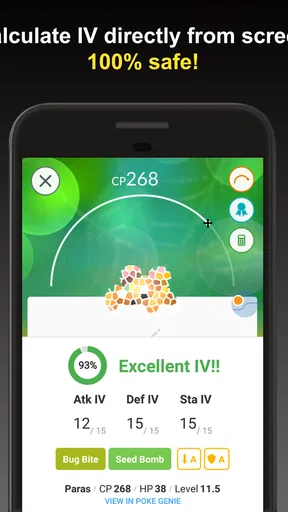
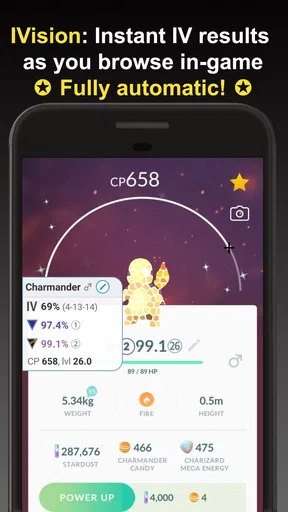
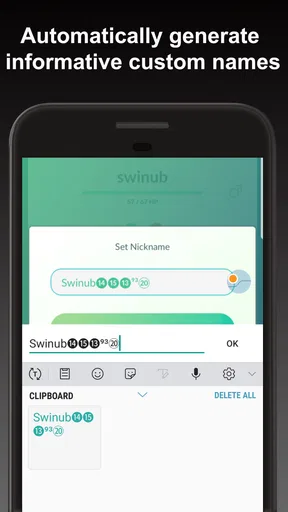
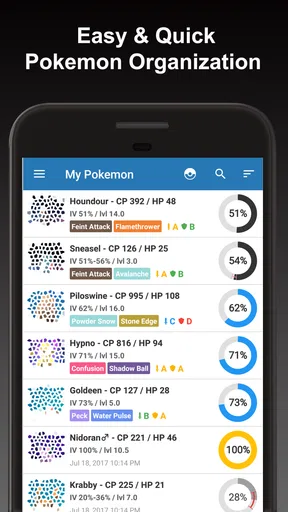
First things first, the IV calculator in Poke Genie is a lifesaver. If you’re not familiar, IVs (Individual Values) are the hidden stats that make your Pokémon unique. To put it simply, higher IVs mean stronger Pokémon. With Poke Genie, you can easily assess these stats and figure out which of your Pokémon are worth investing in. It’s like having a cheat sheet for your Pokémon’s potential!
Remote Raid Coordination
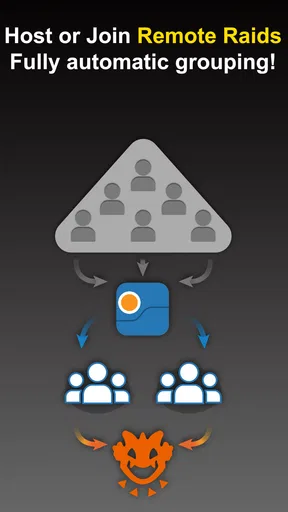
Now, let’s talk about raids. Honestly, coordinating raids can be a bit of a headache, especially if you’re trying to do it solo. But with Poke Genie’s Remote Raid feature, it’s as easy as pie. You can join raids from anywhere, which is perfect for snagging those hard-to-find Pokémon. You simply enter your Trainer Code, and voilà, Poke Genie connects you with other trainers ready to take on the challenge.
Battle Simulator
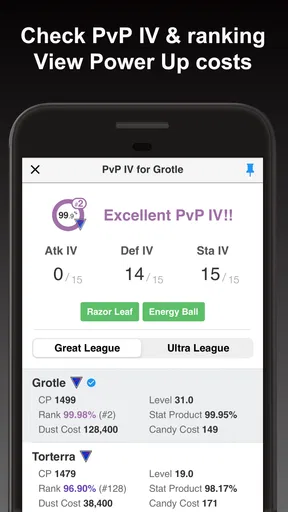
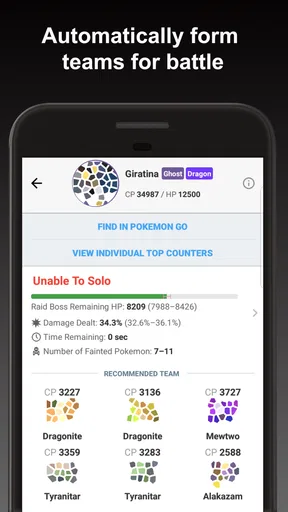
Then there’s the Battle Simulator. This feature is perfect for anyone looking to up their PvP game. You can simulate battles to see how your team stacks up against others. It’s like having a personal coach to help refine your battle tactics. You’ll be taking down gym leaders and other trainers in no time.
Easy-to-Use Interface
One thing I really appreciate is how user-friendly the app is. It’s got a clean, straightforward interface that even the least tech-savvy among us can navigate. Everything is laid out logically, making it easy to find the features you need without a hassle.
Additional Features to Explore
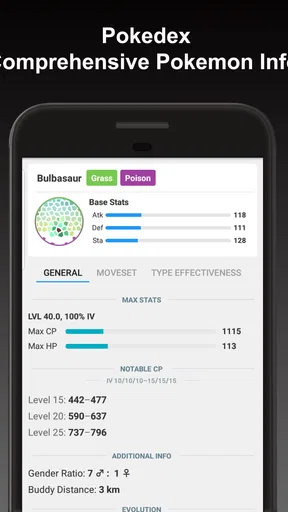
But wait, there’s more! Poke Genie also offers features like team builder, Pokémon type effectiveness, and even move lists. It’s like having a full-on strategy guide at your fingertips. Whether you’re a newbie or a seasoned trainer, there’s something here for everyone.
Who benefits most from the toolkit
I think the app makes the most sense for players who regularly compare catches, plan PvP teams, or want help finding people for raids. A newer player can use it to understand why two Pokémon with the same species may not be equally useful. A more experienced player may care less about basic explanations and more about quickly checking candidates, testing a team idea, or keeping battle references close at hand.
By contrast, if you only play casually and enjoy choosing Pokémon by appearance or personal attachment, a detailed assessment may add friction rather than fun. You do not need to optimize every catch to enjoy Pokémon Go. I would skip the extra planning unless I found myself repeatedly wondering whether a Pokémon was worth keeping, powering up, or bringing into a particular battle.
A practical catch-to-team routine
Here is a realistic way I would use it after a short play session: I catch a few Pokémon, open the IV tool for the ones I am considering, and compare their potential before committing resources. I then check whether one fits the PvP role I have in mind, rather than choosing solely by the most impressive-looking appraisal. If I am preparing for a raid later, I switch tasks and use the raid tools separately instead of trying to make one Pokémon serve every purpose.
That order is useful because it separates collecting decisions from battle decisions. It also helps avoid spending time evaluating every ordinary catch. I would save detailed checks for Pokémon I might actually build around, and use the type and move references when I have a matchup question. The app works best as a decision aid at moments when a choice matters, not as a checklist I have to complete after every encounter.
How it compares with simpler options
The usual alternative is to rely on the game’s own appraisal and remember advice from guides or community discussions. That approach is fine if I only need a quick impression, and it keeps the process inside Pokémon Go. Poke Genie is more convenient when I want several kinds of help together: IV assessment, PvP planning, raid coordination, and reference material. I do not have to treat each feature as a reason to install a separate specialist tool.
The trade-off is that an all-in-one companion asks me to move between the game and another app, and I still need to understand the goal behind a recommendation. A dedicated guide may be clearer for a narrow question, while the in-game appraisal is quicker when I just want a basic check. I prefer Poke Genie when I am actively planning; for an unplanned, casual session, the extra layer may not be worth opening.
When a raid workflow needs a reset
Remote coordination can involve more steps than simply tapping a raid button, so I would check the details I enter and follow the prompts in order. If a session feels stuck, I would first confirm that I have selected the intended raid and entered the relevant Trainer Code correctly, then return to the feature and try the sequence again. Rushing through setup is an easy way to mistake an entry error for a broken tool.
I also would not assume that a raid invitation or a successful connection guarantees a particular in-game outcome. The app helps bring trainers together, but the actual raid still takes place in Pokémon Go. If the game itself is not responding as expected, I would switch back to it and check the in-game state before repeating the same steps in Poke Genie. Keeping those two parts distinct makes troubleshooting more sensible.
When the app may not be the problem
Some confusion comes from the question being asked, not from the calculator. For example, a strong result for one use does not settle whether a Pokémon is the best choice for a different battle format. I would revisit the goal, check the relevant battle context, and compare the options on that basis. Likewise, a simulation is a way to explore a matchup, not a guarantee of how a live battle will unfold.
If a number or recommendation seems surprising, I would verify that I selected the correct Pokémon and that I am reading the right feature before making a decision. Then I would compare the result with the game’s own information and use the app’s references to understand the difference. That is a better response than immediately assuming the app is wrong—or blindly following a result without checking what it means.
Free to start, with a few practical trade-offs
Poke Genie is a free Tools app from developer Poke Genie, and its average rating is 4.7 from around 517,000 ratings. It has been installed over 10 million times, is rated Everyone, and its current version is 8.14.5. It supports Android 6.0 and later. Optional in-app purchases range from $2.99 to $47.99 per item, so I would treat the free starting point as a chance to test whether the tools fit my routine before deciding whether any purchase is worthwhile.
There is a small attention cost to using a companion app: switching between it and Pokémon Go can interrupt a walk or a quick catch session. I would do deeper comparisons when I have a moment to focus, then keep the game itself front and center while playing. That division keeps analysis useful instead of letting it turn every encounter into homework.
What to expect from PvP and raid tools
If you are wondering whether the PvP tools will build a winning team automatically, I would think of them as help for evaluating and refining choices, not a substitute for learning how battles work. The simulator and team builder can make it easier to test an idea, while type effectiveness and move lists help answer specific planning questions. You still have to choose a team that suits your goals and adapt when the actual matchup differs from your expectation.
For raids, the appeal is the coordination as much as the planning: it can help when your local options are limited or when you want to take part with other trainers. It is less compelling if you already have a reliable group and prefer arranging everything through your usual channels. That is not a flaw so much as a matter of whether remote coordination solves a problem you actually have.
Final Thoughts
So, what’s the verdict? If you’re serious about leveling up your Pokémon Go game, Poke Genie is a must-have. It takes all the guesswork out of optimizing your Pokémon and makes strategic gameplay accessible to everyone. Whether you’re into collecting, battling, or just want to connect with other trainers, this app has got you covered. Plus, it’s free to download, so you’ve got nothing to lose. Give it a go and see for yourself how it can transform your Pokémon journey.
Verdict
Strengths of Poke Genie -Remote Raid IV PvP
- Accurate Pokémon stats and IV calculator.
- Easy-to-use interface with intuitive design.
- Supports both casual and competitive players.
- Efficient team builder for optimal battles.
- Regular updates with new features.
Limitations of Poke Genie -Remote Raid IV PvP
- Requires internet for full functionality.
- Ads can be intrusive in free version.
- Limited features without premium upgrade.
- Some features may be complex for beginners.
- Raid participation depends on user availability.
Similar Picks in This Category
View All
Google LLC4.0

Gboard - the Google Keyboard
Google LLC4.5

Google Play services
Google LLC4.3

Google Play Store
Google LLC4.9

Files by Google
Google LLC4.5

SHAREit: Transfer, Share Files
Smart Media4U Technology Pte.Ltd.4.3
Frequently Asked Questions
What is Poke Genie and how does it work?
Poke Genie is a companion app for Pokémon GO that helps trainers optimize their gameplay. It offers features like IV checking, PvP ranking, and remote raid coordination. The app uses screenshots from your game to provide insights, ensuring you make the most of your Pokémon without violating any game terms.
Is Poke Genie safe to use with Pokémon GO?
Yes, Poke Genie is safe and compliant with Pokémon GO’s terms of service. It operates by utilizing screenshots rather than interacting directly with the game’s code. This ensures that your account remains secure while you benefit from the app’s features and insights.
What features does Poke Genie offer for PvP battles?
Poke Genie provides comprehensive tools for PvP enthusiasts, including battle simulations, team building advice, and rankings. The app helps you identify the best Pokémon for Great, Ultra, and Master Leagues, ensuring you have a competitive edge in battles by highlighting optimal movesets and strategies.
How does Poke Genie assist with remote raids?
Poke Genie simplifies remote raids by allowing users to join raid lobbies and coordinate with other trainers worldwide. The app provides detailed instructions and notifications, making it easy to participate in raids and catch legendary Pokémon without physically being at the raid location.
Does Poke Genie require an internet connection to function?
Yes, Poke Genie requires an internet connection for most of its features, such as accessing the latest raid information, syncing data, and participating in remote raids. However, some functionalities, like IV checking, can be done offline once the necessary screenshots are loaded.
